> 文章列表 > 钉钉APP中没有消息提示声音了怎么回事

钉钉APP中没有消息提示声音了怎么回事

钉钉APP中没有消息提示声音了怎么回事

大家在使用钉钉时,可能不小心关闭了消息提示音功能,怎么开启呢,下面小编介绍一下。

具体如下:

  1. 1. 打开桌面的【钉钉】

    钉钉APP中没有消息提示声音了怎么回事

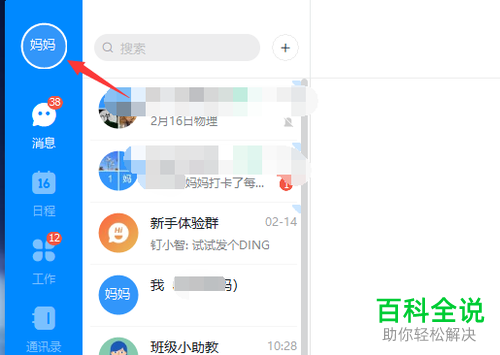
  2. 2. 登录后,点击页面左上角的个人头像

  3. 钉钉APP中没有消息提示声音了怎么回事

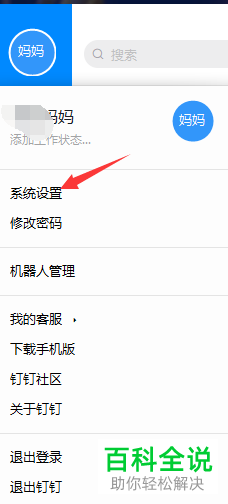
  4. 3. 如图界面中,点击箭头指示的【系统设置】

    钉钉APP中没有消息提示声音了怎么回事

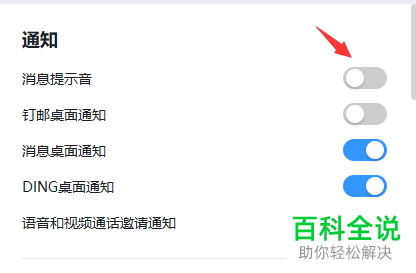
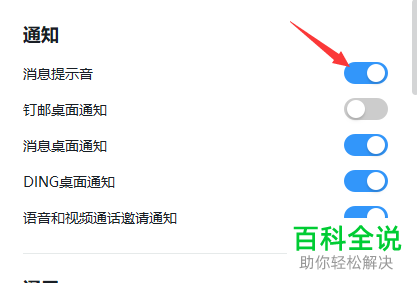
  5. 4. 点击“消息提示音”后面的按钮,开启该功能即可

    钉钉APP中没有消息提示声音了怎么回事

  6. 钉钉APP中没有消息提示声音了怎么回事