
IE6内存泄露的另类解决方法

Hedger Wang 在国内 blog 上得到的方法:使用 try … finally 结构来使对象最终为 null ,以阻止内存泄露。
其中举了个例子:
function createButton() {
var obj = document.createElement(\"button\");
obj.innerHTML = \"click me\";
obj.onclick = function() {
//handle onclick
}
obj.onmouseover = function() {
//handle onmouseover
}
return obj;//return a object which has memory leak problem in IE6
}
var dButton = document.getElementById(\"d1\").appendChild(createButton());
//skipped....
对于 IE6 中,引起内存泄露的原因,可看《Understanding and Solving Internet Explorer Leak Patterns》一文。
上面的例子,应该属于上文中的 “Closures”原因。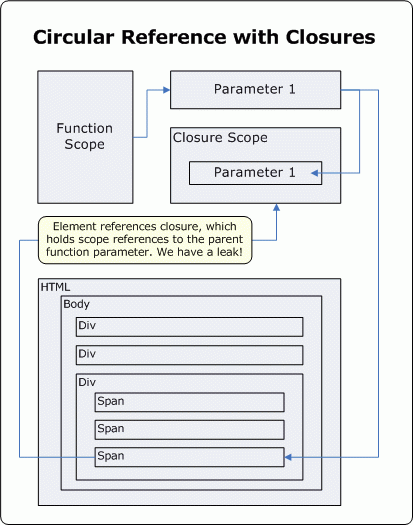
再看下用 try … finally 的解决方法:
/**
* Use the try ... finally statement to resolve the memory leak issue
*/
function createButton() {
var obj = document.createElement(\"button\");
obj.innerHTML = \"click me\";
obj.onclick = function() {
//handle onclick
}
obj.onmouseover = function() {
//handle onmouseover
}
//this helps to fix the memory leak issue
try {
return obj;
} finally {
obj = null;
}
}
var dButton = document.getElementById(\"d1\").appendChild(createButton());
//skipped....
可能大家有疑问: finally 是如何解析的呢?
答案是:先执行 try 语句再执行 finally 语句。
例如:
function foo() {
var x = 0;
try {
return print(\"call return \" ( x));
} finally {
print(\"call finally \" ( x));
}
}
print(\'before\');
print(foo());
print(\'after\');
返回的结果为:
print » before
print » call return 1
print » call finally 2
print » true
print » after
更多详细的演示:
《Finally, the alternative fix for IE6’s memory leak is available》
相关的一些讨论:
《Is “finally” the answer to all IE6 memory leak issues?》


