
在Linux的系统Shell脚本中使用if语句的方法
Bourne Shell 的 if 语句和大部分编程语言一样 - 检测条件是否真实,如果条件为真,shell 会执行这个 if 语句指定的代码块,如果条件为假,shell 就会跳过 if 代码块,继续执行之后的代码。
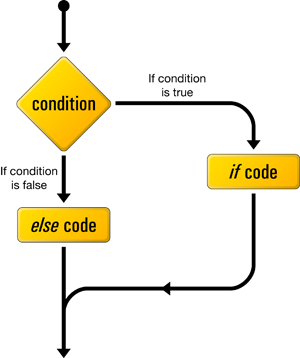
if 语句的语法:
代码如下:
if [ 判断条件 ]
then
command1
command2
……..
last_command
fi
Example:
#!/bin/bash
number=150
if [ $number -eq 150 ]
then
echo \"Number is 150\"
fi
if-else 语句:
除了标准的 if 语句之外,我们还可以加入 else 代码块来扩展 if 语句。这么做的主要目的是:如果 if 条件为真,执行 if 语句里的代码块,如果 if 条件为假,执行 else 语句里的代码块。
语法:
代码如下:
if [ 判断条件 ]
then
command1
command2
……..
last_command
else
command1
command2
……..
last_command
fi
Example:
代码如下:
#!/bin/bash
number=150
if [ $number -gt 250 ]
then
echo \"Number is greater\"
else
echo \"Number is smaller\"
fi
If..elif..else..fi 语句 (简写的 else if)
Bourne Shell 的 if 语句语法中,else 语句里的代码块会在 if 条件为假时执行。我们还可以将 if 语句嵌套到一起,来实现多重条件的检测。我们可以使用 elif 语句(else if 的缩写)来构建多重条件的检测。
语法 :
代码如下:
if [ 判断条件1 ]
then
command1
command2
……..
last_command
elif [ 判断条件2 ]
then
command1
command2
……..
last_command
else
command1
command2
……..
last_command
fi
Example :
代码如下:
#!/bin/bash
number=150
if [ $number -gt 300 ]
then
echo \"Number is greater\"
elif [ $number -lt 300 ]
then
echo \"Number is Smaller\"
else
echo \"Number is equal to actual value\"
fi
多重 if 语句 :
If 和 else 语句可以在一个 bash 脚本里相互嵌套。关键词 “fi” 表示里层 if 语句的结束,所有 if 语句必须使用 关键词 “fi” 来结束。
基本 if 语句的嵌套语法:
代码如下:
if [ 判断条件1 ]
then
command1
command2
……..
last_command
else
if [ 判断条件2 ]
then
command1
command2
……..
last_command
else
command1
command2
……..
last_command
fi
fi
Example:
代码如下:
#!/bin/bash
number=150
if [ $number -eq 150 ]
then
echo \"Number is 150\"
else
if [ $number -gt 150 ]
then
echo \"Number is greater\"
else
echo \"\'Number is smaller\"
fi
fi


