
centos下如何使用fdisk扩展分区容量大小
扩展磁盘空间
硬盘空间为20G,使用vSphere Client增加磁盘大小,需要再增加10G空间;
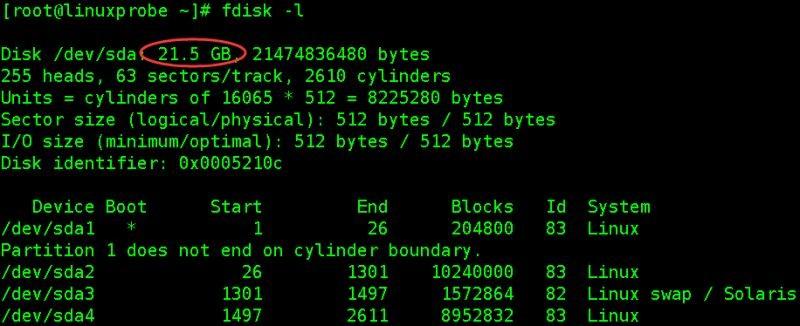
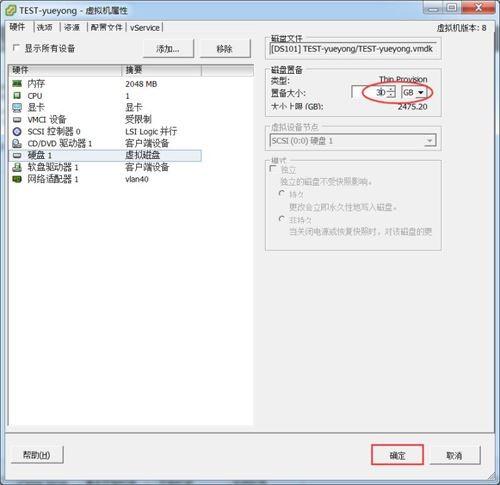
扩展完后,重启系统,再次使用fdisk -l查看,会发现硬盘空间变大了;
[root@linuxprobe ~]# fdisk -lDisk /dev/sda: 32.2 GB, 32212254720 bytes255 heads, 63 sectors/track, 3916 cylindersUnits = cylinders of 16065 * 512 = 8225280 bytesSector size (logical/physical): 512 bytes / 512 bytesI/O size (minimum/optimal): 512 bytes / 512 bytesDisk identifier: 0x0005210c Device Boot StartEnd Blocks Id System/dev/sda1 *1 26 204800 83 LinuxPartition 1 does not end on cylinder boundary./dev/sda2 26 1301 10240000 83 Linux/dev/sda3 1301 1497 1572864 82 Linux swap / Solaris/dev/sda4 1497 2611 8952832 83 Linux[root@linuxprobe ~]# df -hTFilesystem Type Size Used Avail Use% Mounted on/dev/sda2 ext4 9.7G 1.5G 7.7G 16% /tmpfs tmpfs 939M 0 939M 0% /dev/shm/dev/sda1 ext4 194M 34M 151M 19% /boot/dev/sda4 ext4 8.5G 148M 7.9G 2% /data


